Github个人主页美化
Github个人主页美化
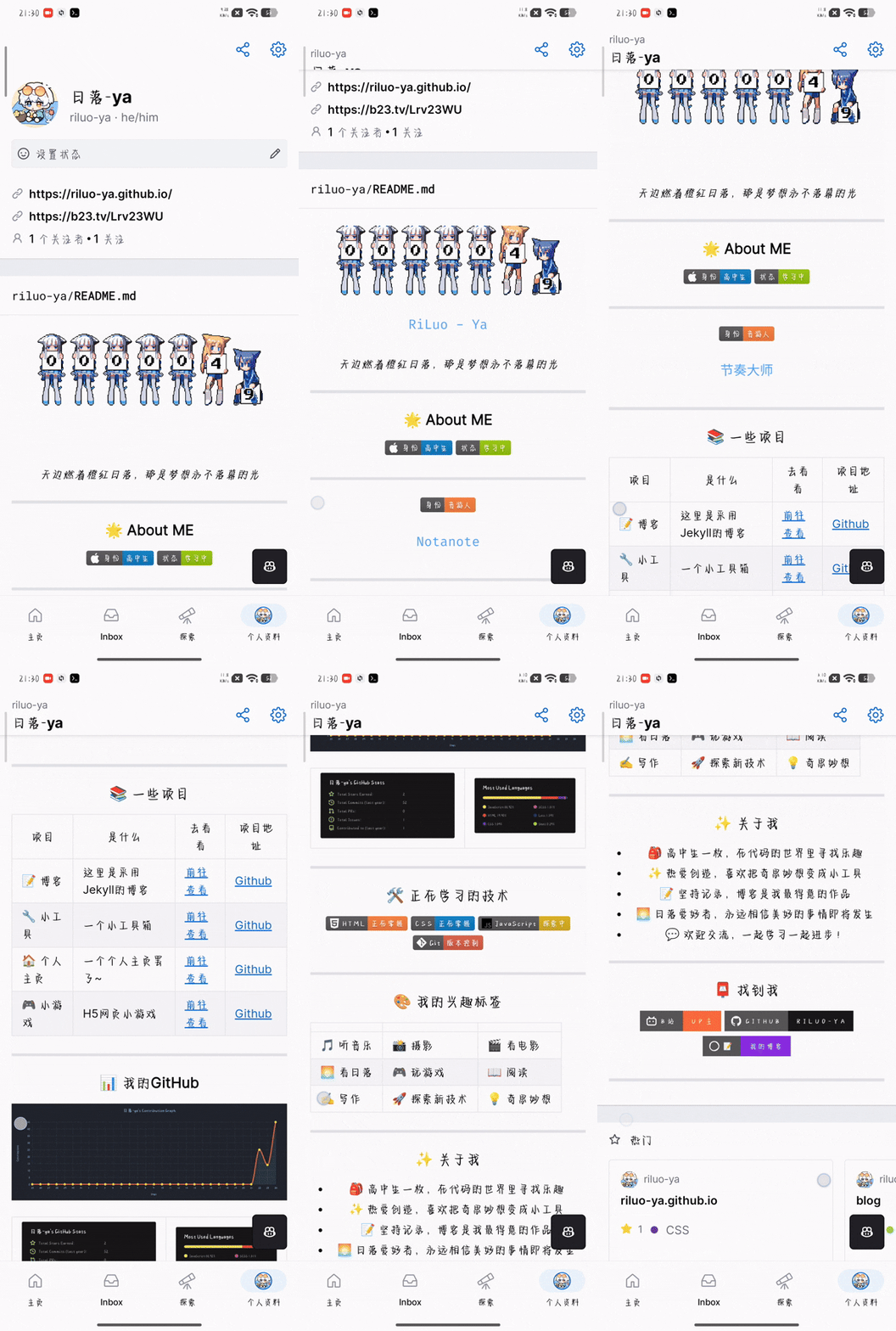
这篇文章主要是讲给自己的Github主页美化,效果如下图所示
 —
— 
新建项目
1.在Github主页点击NEW新建一个仓库 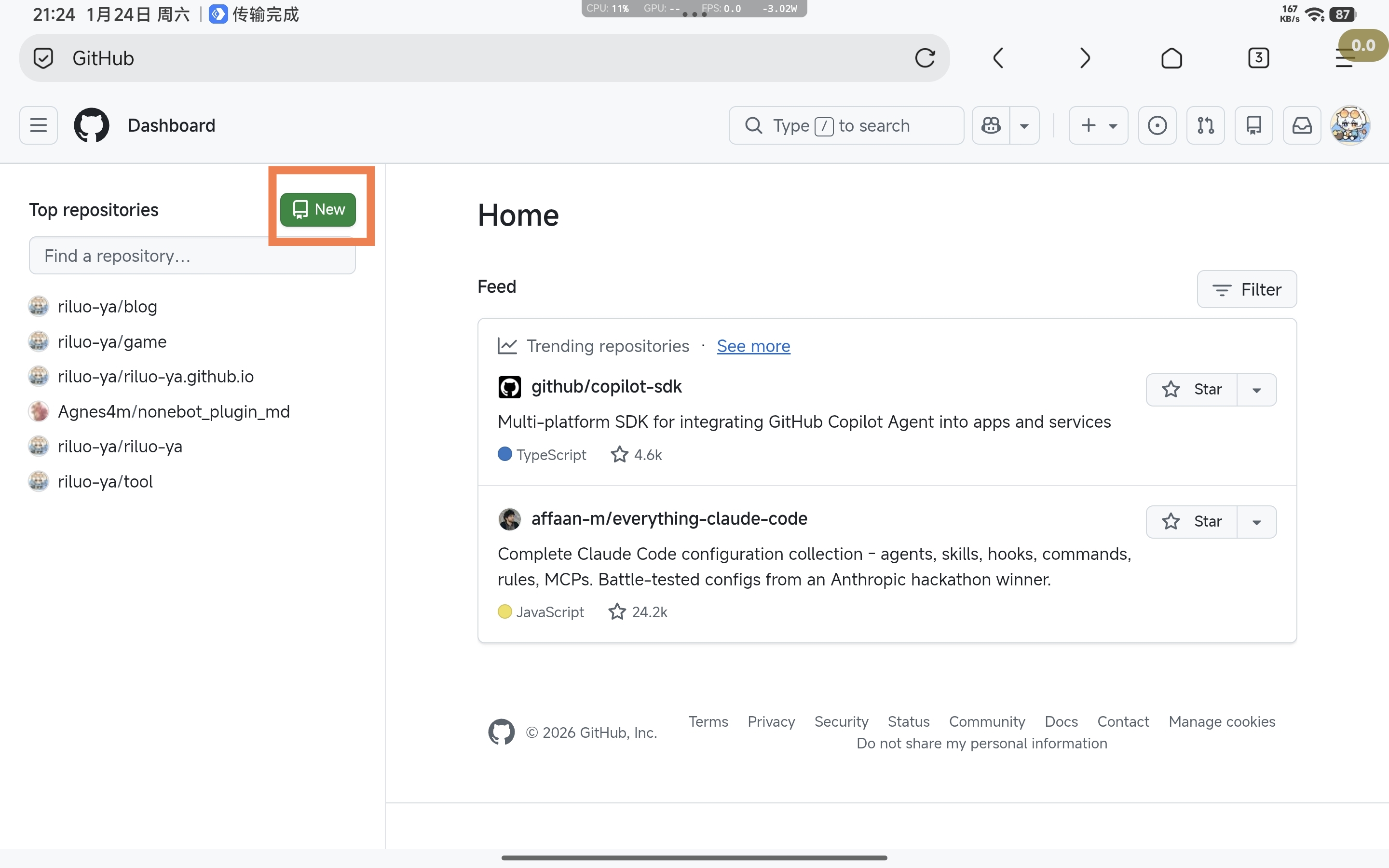
2.仓库名称填自己的用户名 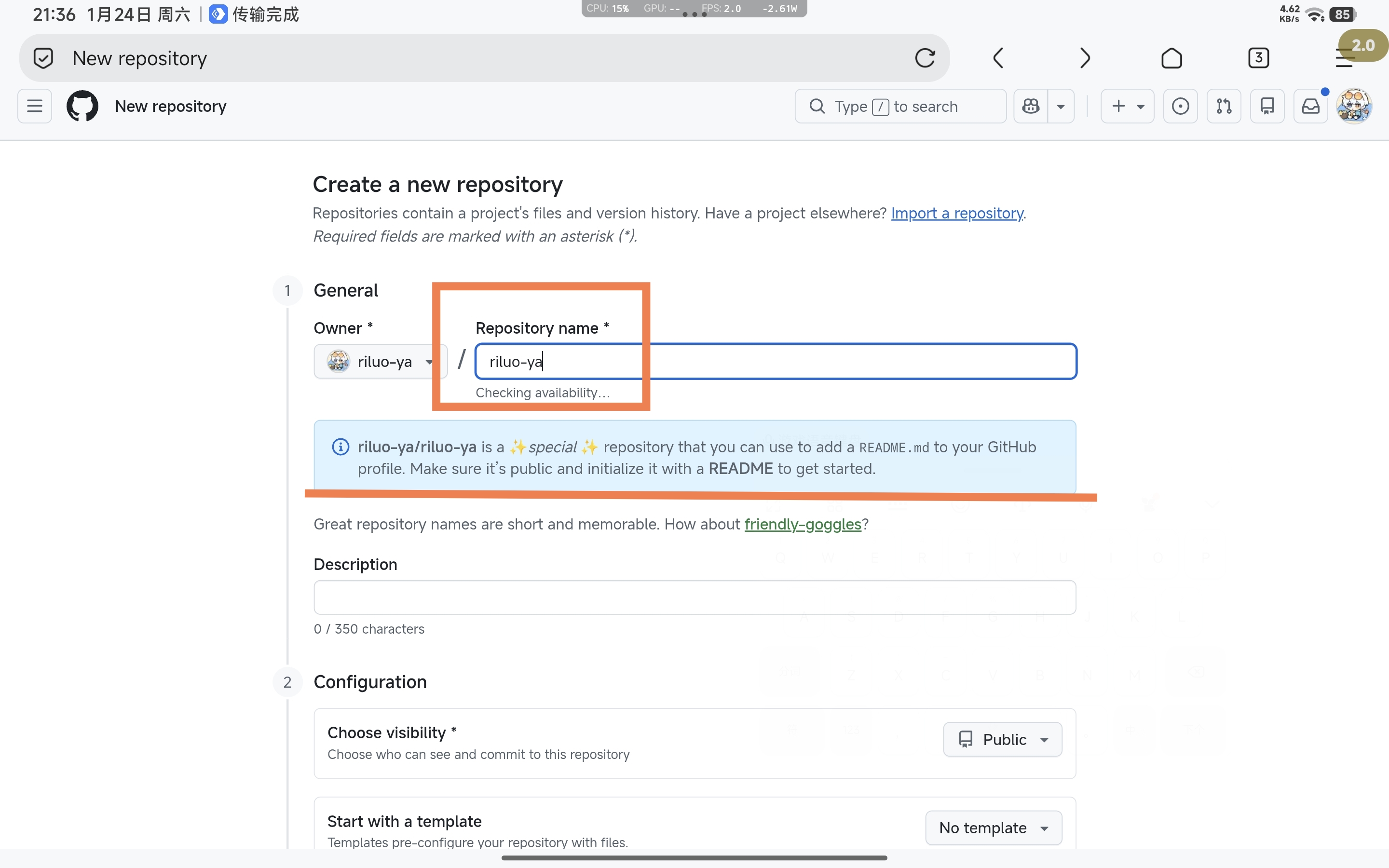
3.划到下面找到Add README后面开关点开,添加一个README 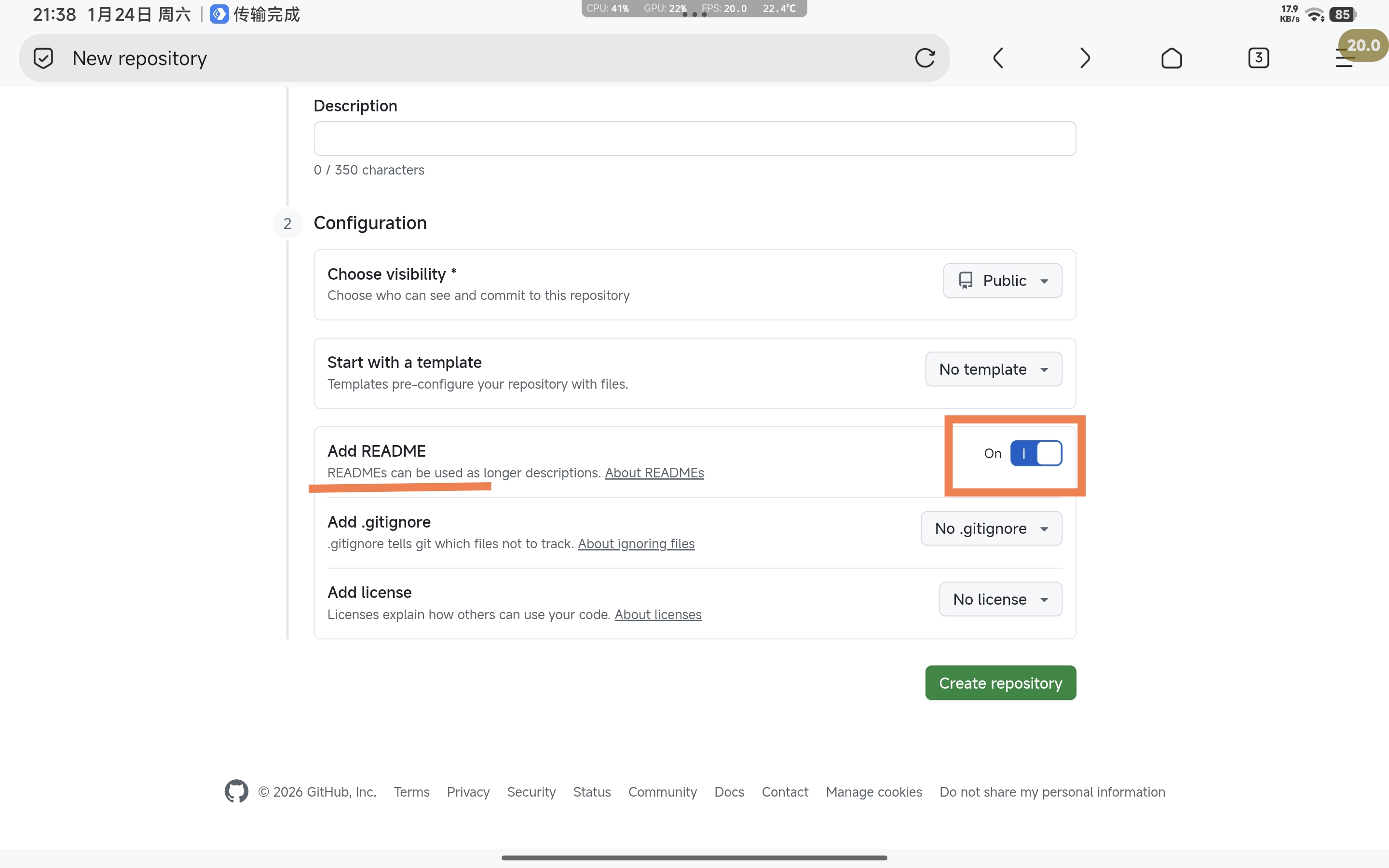
4.点击Create repository创建仓库
编辑README.md
1.新建文件后就自动跳转到项目了 2.接下来就是编辑readme.md文件了 3.点击右上角的笔 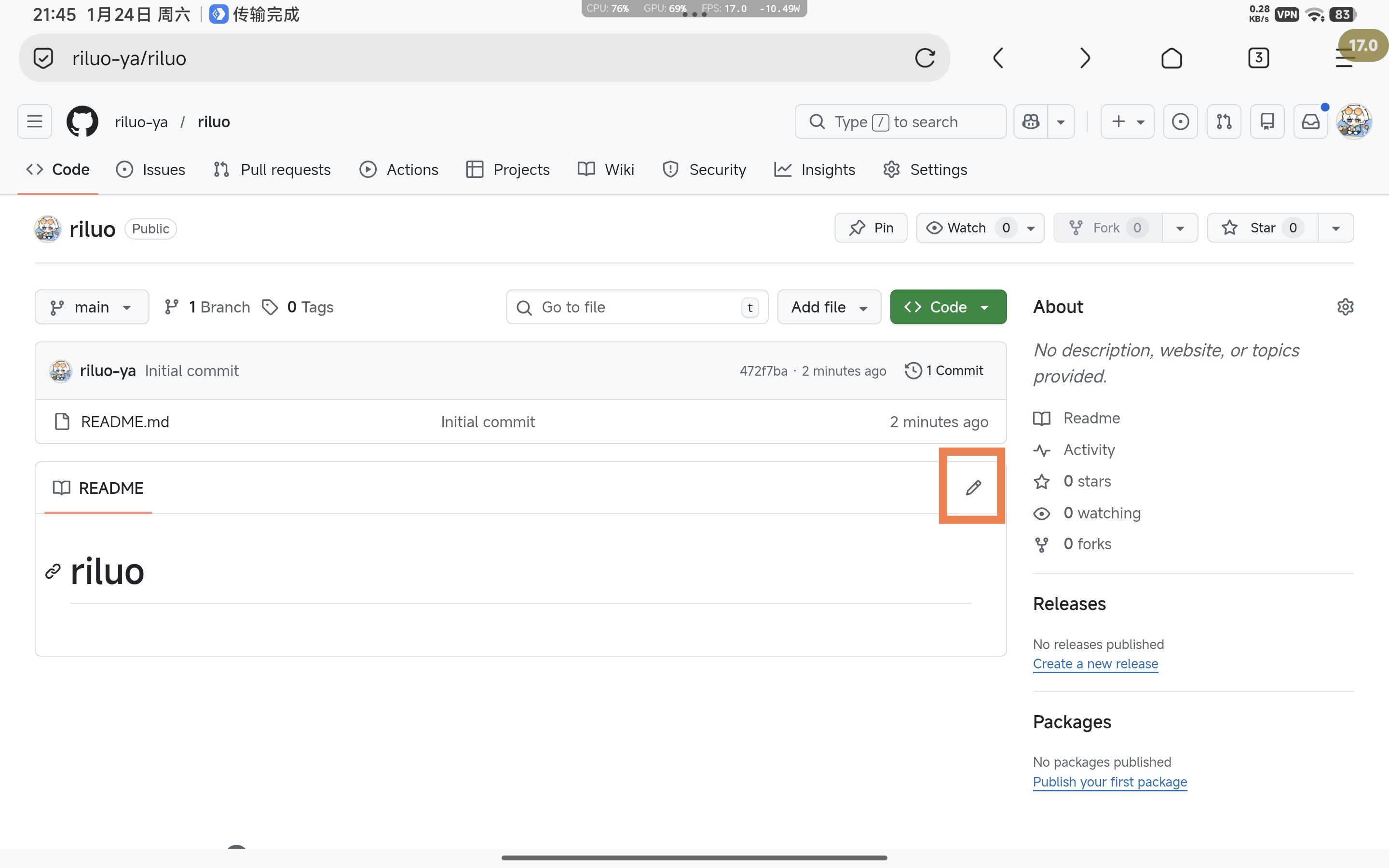 4.我们把里面的内容删掉就可以开始编辑了!
素材
这里给大家找了几个可以用得上的素材 1.贡献表
1
https://github-readme-activity-graph.vercel.app/graph?username=你的用户名
2.常用的语言
1
https://github-readme-stats.vercel.app/api/top-langs/?username=你的用户名
3.Github Stats
1
https://github-readme-stats.vercel.app/api?username=你的用户名
4.仙途
1
https://github-immortality.vercel.app/api?username=你的用户名
5.打字机
1
https://readme-typing-svg.herokuapp.com?lines=要打的字
以上嵌入方式是
1
2
3
<p align="center">
  <img src="链接" width="100%" />
</p>
6.访客记录
1

7.标签 徽章
1
https://img.shields.io/static/v1?label=左边标签&message=右边内容&color=颜色
示例:

#最后 我们把文件按照自己的内容编辑好点击右上角就可以了! 以下是我的,可以做参考
1
2
3
4
5
6
7
8
9
10
11
12
13
14
15
16
17
18
19
20
21
22
23
24
25
26
27
28
29
30
31
32
33
34
35
36
37
38
39
40
41
42
43
44
45
46
47
48
49
50
51
52
53
54
55
56
57
58
59
60
61
62
63
64
65
66
67
68
69
70
71
72
73
74
75
76
77
78
79
80
81
82
83
84
85
86
87
88
89
90
91
92
93
94
95
96
97
98
99
100
101
102
103
104
105
106
107
108
109
110
111
112
113
114
115
116
117
118
119
120
121
122
123
<div align="center">

<p align="center">
<img src="https://readme-typing-svg.herokuapp.com?font=Fira+Code&size=24&duration=3000&pause=500&color=58A6FF¢er=true&vCenter=true&width=500&lines=RiLuo+-+Ya;永远相信美好的事情即将发生" alt="Typing SVG" />
</p>
*天边燃着橙红日落,那是梦想永不落幕的光*
---
### 🌟 About ME
<div align="center">


---

<p align="center">
<img src="https://readme-typing-svg.herokuapp.com?font=Fira+Code&size=24&duration=1500&pause=300&color=58A6FF¢er=true&vCenter=true&width=500&lines=Phigros;Phira;初音未来:缤纷舞台;喵斯快跑;Notanote;节奏大师;Simple;RYCEAM;Milthm;Rizline" alt="Typing SVG" />
</p>
</div>
---
### 📚 一些项目
<div align="center">
| 项目 | 是什么 | 去看看 | 项目地址 |
|------|--------|--------|--------|
| 📝 **博客** | 这里是采用Jekyll的博客 | [前往查看](https://riluo-ya.github.io/blog) | [Github](https://github.com/riluo-ya/blog) |
| 🔧 **小工具** | 一个小工具箱 | [前往查看](https://riluo-ya.github.io/tool) | [Github](https://github.com/riluo-ya/tool) |
| 🏠 **个人主页** | 一个个人主页罢了~ | [前往查看](https://riluo-ya.github.io/) | [Github](https://github.com/riluo-ya/riluo-ya.github.io) |
| 🎮 **小游戏** | H5网页小游戏 | [前往查看](https://riluo-ya.github.io/game) | [Github](https://github.com/riluo-ya/game) |
</div>
---
### 📊 我的GitHub
<div align="center">
<p align="center">
<img src="https://github-readme-activity-graph.vercel.app/graph?username=riluo-ya&theme=react-dark&bg_color=20232a&line=FF6B35&point=FFD93D&area=true&hide_border=true" width="100%" />
</p>
<table>
<tr>
<td><img src="https://github-readme-stats.vercel.app/api?username=riluo-ya&show_icons=true&hide_rank=true&theme=dark" alt="GitHub Stats" /></td>
<td><img src="https://github-readme-stats.vercel.app/api/top-langs/?username=riluo-ya&layout=compact&langs_count=6&theme=dark" alt="Top Languages" /></td>
</tr>
</table>
</div>
---
### 🛠️ 正在学习的技术
<div align="center">




</div>
---
### 🎨 我的兴趣标签
<div align="center">
| | | |
|---|---|---|
| 🎵 听音乐 | 📸 摄影 | 🎬 看电影 |
| 🌅 看日落 | 🎮 玩游戏 | 📖 阅读 |
| ✍️ 写作 | 🚀 探索新技术 | 💡 奇思妙想 |
</div>
---
### ✨ 关于我
- 🎒 **高中生一枚**,在代码的世界里寻找乐趣
- ✨ **热爱创造**,喜欢把奇思妙想变成小工具
- 📝 **坚持记录**,博客是我最得意的作品
- 🌅 **日落爱好者**,永远相信美好的事情即将发生
- 💬 **欢迎交流**,一起学习一起进步!
---
### 📮 找到我
<div align="center">
[](https://space.bilibili.com/1691468668)
[](https://github.com/riluo-ya)
[](https://riluo-ya.github.io/blog)
</div>
---
<div align="center">
</div>
<!--
**riluo-ya/riluo-ya** is a ✨ special ✨ repository because its `README.md` (this file) appears on your GitHub profile.
-->
本文由作者按照 CC BY 4.0 进行授权